- Empty cart.
- Continue Shopping

School Locker Lock Types: Portable, Built-In Combination, and Built-In Keyed
- Posted on
- Categories: master lock,school locker locks

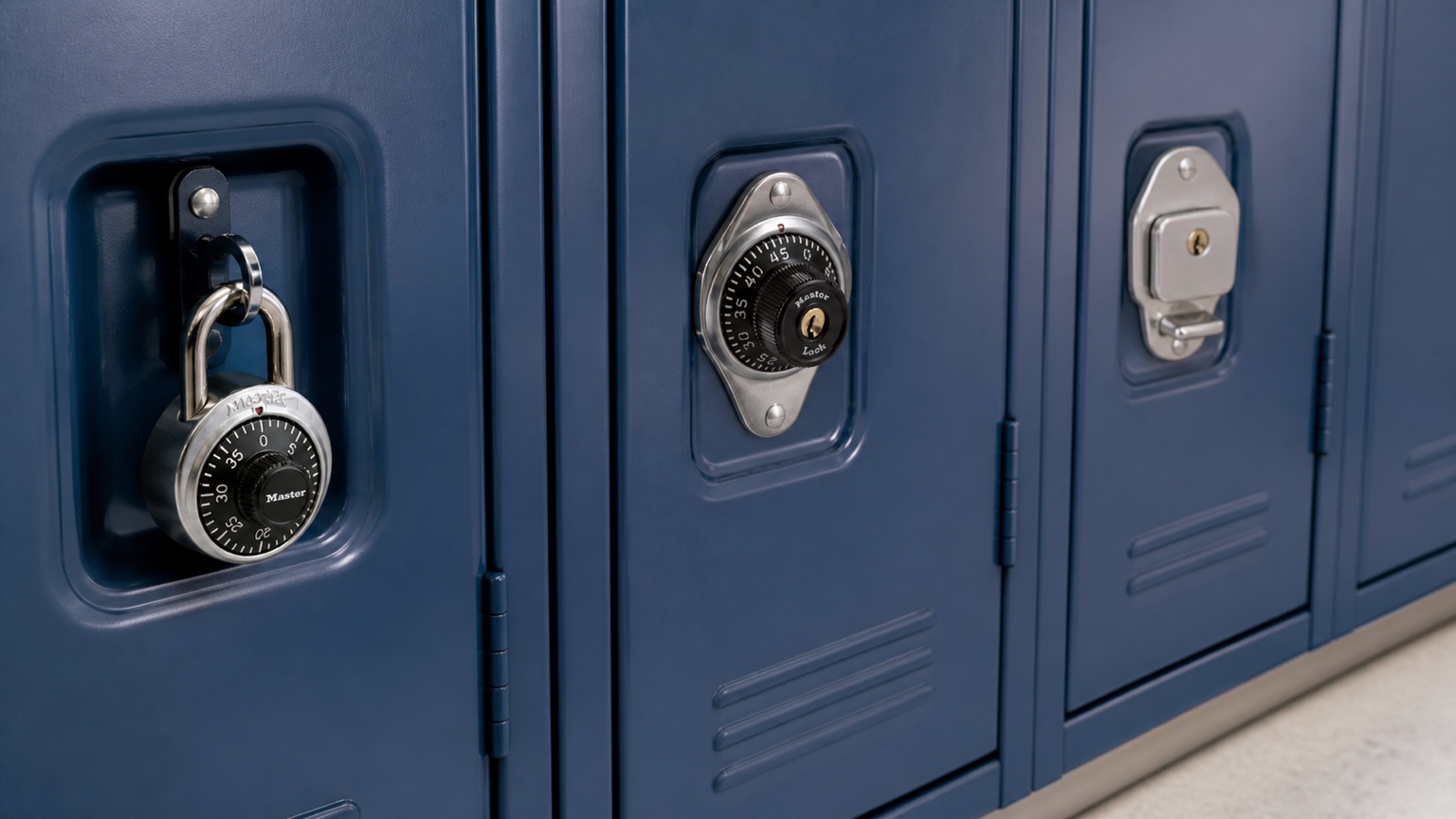
Short answer: school locker lock types are easiest to understand in layers. “Portable” or “built in” describes how the lock relates to the locker. “Combination” or “keyed” describes how the user opens it. “Springbolt,” “deadbolt,” and “wrap-around latch” describe how a built-in mechanism secures the door. A useful selection starts with the actual locker hardware and school operating policy, not one label by itself.
Key Takeaways
- A portable lock passes through a hasp or padlock eye; a built-in lock mounts to the locker door and works with its latch system.
- Portable locks may be combination-operated or keyed, so “portable” is a format rather than an access method.
- Built-in combination and built-in keyed locks can each use different bolt actions for different locker mechanisms.
- Automatic and manual locking describe what happens when the door closes; they do not identify every aspect of fit.
- Hinge side, handle or latch type, door preparation, user assignment, and authorized staff access should be confirmed before choosing a model.
School Locker Lock Types at a Glance
| Lock type | Relationship to locker | User credential | Primary selection questions |
|---|---|---|---|
| Portable combination padlock | Removable; passes through a padlock eye or hasp | Assigned or user-managed combination, depending on product | Eye size, shackle clearance, combination administration, staff access |
| Portable keyed padlock | Removable; passes through a padlock eye or hasp | Key | Eye size, shackle clearance, keying plan, lost-key process |
| Built-in combination lock | Mounted to door; engages the locker mechanism | Combination, sometimes with an authorized supervisory path | Latch, bolt action, handing, door preparation, administration |
| Built-in keyed lock | Mounted to door; engages the locker mechanism | Key | Latch, bolt action, handing, cylinder/keying plan, door preparation |
This table is a taxonomy, not a compatibility chart. Two locks in the same row may use different dimensions, handing, bolts, or administrative systems. Confirm the exact product against the locker manufacturer’s current guidance and the physical application.
First Layer: Portable vs. Built In
A portable padlock remains separate from the locker. Its shackle passes through a padlock eye or a closed hasp, and the whole lock can be removed. Portable selection therefore centers on the eye opening, shackle height and diameter, clearance around the handle, lock-body space, and how the school assigns and manages the lock.
A built-in lock is mounted through or behind the door and engages a specific handle or latch. The visible dial or key cylinder is only part of the system. Behind the door, the bolt must travel in the correct direction and interact with the locker hardware. Built-in selection therefore requires more than matching a familiar faceplate.
School Lock Supply organizes removable institutional choices in the Master portable combination lock category, while permanently mounted options are divided into built-in combination locks and built-in keyed locks. Those collections are starting points, not promises that every item fits every locker. A recessed padlock-eye application can then move to the focused short-shackle locker lock guide.
Second Layer: Combination vs. Keyed Access
Combination and keyed describe the everyday credential. A combination lock removes the need for the user to carry a key, but the organization still needs a process for assignments, forgotten combinations, record protection, reassignments, and authorized access. A keyed lock replaces memorization with key custody, duplication controls, spare-key policy, and a lost-key process.
Within portable combination locks, institutional preset-and-charted products differ from consumer set-your-own products. For example, Master Lock describes the 1502 and 1525 as three-number institutional combination padlocks. The 1525 has a supervisory key-control feature; the 1502 does not. That difference concerns administration, while the shackle and locker eye govern physical fit. Schools selecting for a particular student setting can continue with the middle school combination lock guide.
Within built-in locks, the credential still does not identify the latch. A combination model and a keyed model may each be offered for lift-handle, horizontal-latch, box-locker, or rotating-latch applications. Start with the locker mechanism, then choose the credential and administrative configuration that supports written school policy.
Third Layer: Springbolt, Deadbolt, and Latch Application
A springbolt can retract as the door closes and then engage the locker hardware. A deadbolt moves into a secured position without relying on that same spring action. Master Lock’s locker guidance also distinguishes automatic locking from manual locking: some models secure as the door closes, while others require the user to turn the dial or otherwise complete a locking action.
Those terms should not be used as quality rankings. A springbolt is not automatically “better” than a deadbolt, and automatic locking is not suitable simply because it sounds convenient. The locker’s handle, latch geometry, hinge orientation, and intended user workflow determine which mechanism should be evaluated.
Examples show why the layers matter. Master Lock identifies the 1630 as a built-in combination model for a standard lift-handle application, while the 1670 uses a manual deadbolt across listed locker applications. For a handed lift-handle pair, the Master Lock 1630 vs. 1631 guide separates right- and left-hinged applications. In the keyed range, the 1710 uses a manual deadbolt, the 1714 uses an automatic springbolt, and the 1790 is designed for a rotating or Wrap-Around-Latch application. These examples explain terminology; they do not substitute for a current compatibility check.
Assigned Use vs. Shared Use Is a Separate Decision
A lock type does not by itself determine whether a locker is assigned for a term or used temporarily by different people. A portable padlock may be issued to one student, and a built-in lock may also remain assigned to one user. Shared or day-use programs need a deliberate method for clearing the prior user’s access, supervising exceptions, and preparing the locker for the next user.
Document that operating pattern before looking at product names. Also decide who owns the lock, who holds authorized access credentials, how records are protected, and what happens when a locker is reassigned. These workflow choices can eliminate otherwise plausible product families before detailed fit work begins.
A Practical Lock-Type Selection Sequence
- Identify the format. Confirm whether the locker has a padlock eye or an existing built-in preparation.
- Record the hardware. Photograph the full door, hinge side, handle, latch, rear mechanism, and readable manufacturer or model markings.
- Define the use pattern. State whether the locker is assigned, shared, seasonal, or part of a replacement program.
- Choose the credential policy. Compare combination management with key custody and determine whether an authorized staff-access path is required.
- Match the mechanism. For built-ins, confirm bolt action, latch type, handing, door preparation, and relevant thickness.
- Verify the exact model. Use current manufacturer and locker-manufacturer information, then test representative hardware before a broad deployment.
When the purpose is to identify an unknown installed lock rather than compare the type categories, use the replacement school locker lock identification guide.
Frequently Asked Questions
What are the main school locker lock types?
The broad formats are portable padlocks and built-in locks. Each can then be classified by combination or keyed access, while built-in products also differ by bolt and latch mechanism.
Is a combination lock always a portable padlock?
No. Combination operation is available in both removable padlocks and locks mounted into the locker door. “Combination” describes the credential, not the mounting format.
What is the difference between a built-in combination lock and a built-in keyed lock?
The ordinary user opens one with a combination and the other with a key. Both still need to match the locker’s latch, bolt action, handing, and door preparation.
Does an automatic locker lock secure when the door closes?
That is the general distinction Master Lock makes from manual locking, but operation is model-specific. Confirm the current instructions and test the proposed lock with the actual locker.
Can one built-in lock fit lift-handle, box, and rotating-latch lockers?
Do not make that assumption. These applications can require different bolt travel and mounting relationships, even when the lock faces look similar.
How should a school begin when the existing lock type is unknown?
Record whether the lock is removable or mounted, photograph both sides safely, note the hinge and latch, capture readable model information, and measure the relevant hardware before requesting help.
Product References
- Master Lock locker design resource center
- Master Lock locker installation, mechanism, and selection guidance
- Master Lock 1502 portable combination padlock specifications and Master Lock 1525 specifications
Get Help Identifying the Right Lock Type
School Lock Supply can help organize the format, credential, mechanism, fit, and administration questions for a school project. Request product-selection or quote help with safe photos, locker and lock markings, hinge and latch information, relevant measurements, use pattern, quantities by hardware type, and authorized staff-access requirements.